What is Maskmyprompt?
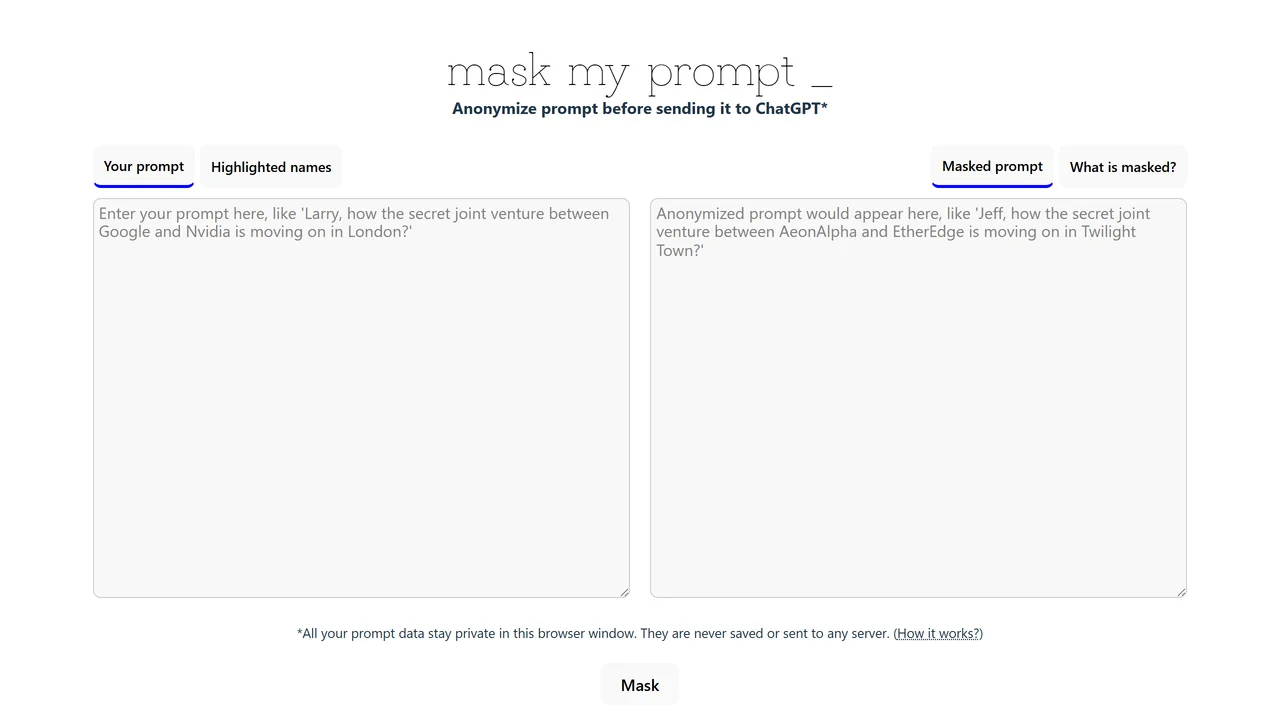
Maskmyprompt addresses a critical need for privacy-conscious users of AI chatbots like ChatGPT. When you send prompts to an AI, you might inadvertently include personal or sensitive information such as names, addresses, credit card numbers, or proprietary business data. Maskmyprompt automatically scans your input and replaces these elements with generic placeholders (e.g., [NAME], [EMAIL], [PHONE]) before the prompt ever reaches ChatGPT. The tool uses pattern recognition to identify common data types, but it also allows you to manually mask additional text if needed.
The process is straightforward: you paste your prompt into the text area, click a button, and the masked version appears instantly. You can copy the sanitized prompt and use it in ChatGPT without worry. Importantly, Maskmyprompt performs all processing locally in your browser; no data is sent to any server except the final masked prompt you choose to send to ChatGPT. This means your original sensitive information never leaves your computer.
Use cases include professionals handling client data, writers protecting personal information in anecdotes, developers sharing code snippets that may contain API keys, and researchers discussing sensitive topics. The tool is free to use with no account required, making it accessible to everyone. While it's not foolproof against all privacy risks, it significantly reduces the chance of accidental data leaks. Future updates may include more advanced masking options and support for additional data types. Maskmyprompt is a simple yet powerful addition to any privacy toolbox.
Use Cases
Key Features
Automatic detection of sensitive data (names emails phone numbers etc.) One-click masking with placeholder replacement Local processing in browser – no data stored or sent to servers Free to use with no account required Manual override for custom masking Fast and intuitive interfaceWho is it for?
Privacy, conscious ChatGPT users, professionals handling sensitive data, writers, researchers, and anyone concerned about sharing personal information with AI.